
Common
Field
A Field is a component that provides an output that can be used for extracting values and can be used for validation.
Provide Results/Parameters
Provide Results is an arrow that takes an input and provides it as output to another component. For example, you may want to provide your search results to a field to perform a simple extraction.

Static Area
Static Area is a component that allows selection of a specific area of a document or page. You can specify which pages to scan and constrain the area by providing percentages of area for the top, right, left, and bottom.
Provide Area
Provide Area is an arrow that feeds the static area component as input to another locator.
Geometric Proximity Rule
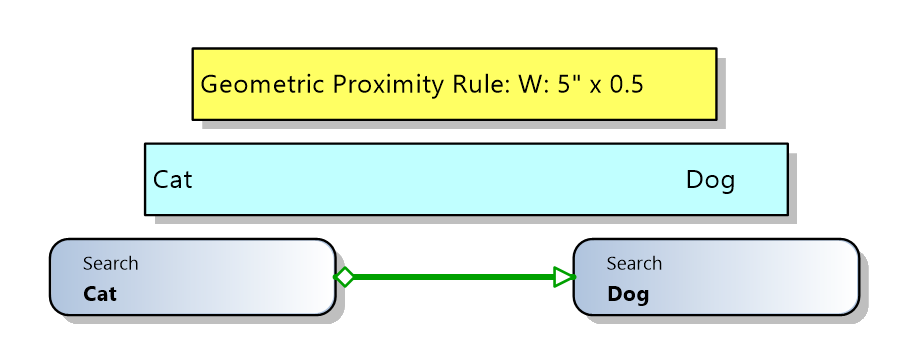
A geometric proximity rule can be applied between two searches, constraining the search area from the input search for the area of the output search. Region(s) can be specified relative to the input search, and priority of the regions can be determined in the ordering. Other fields like allowing overlap and finding the closest result can be adjusted. If there are multiple regions looked at once, beware of using the and operator.
Logical Proximity Rule
Similarly, a proximity rule and be placed between two searches using a logical constraint. A logical constraint can be defined by specifying the distance before or after the input search, which can use cells or lines. There is also an option to include the searched text with the specified logical distance to allow overlap for fine tuning.
Choose First
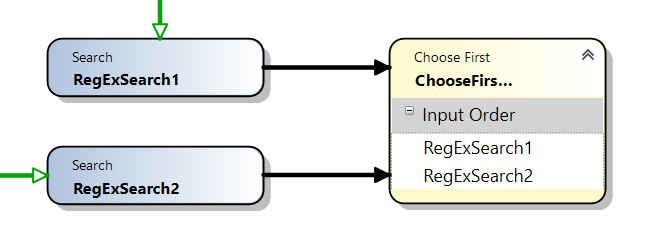
Choose First is a component that can stem from multiple inputs, and it takes the first input that receives a value. If no value is retained for the first input, it would follow the specified input order until a value is found.
Updated about 2 hours ago